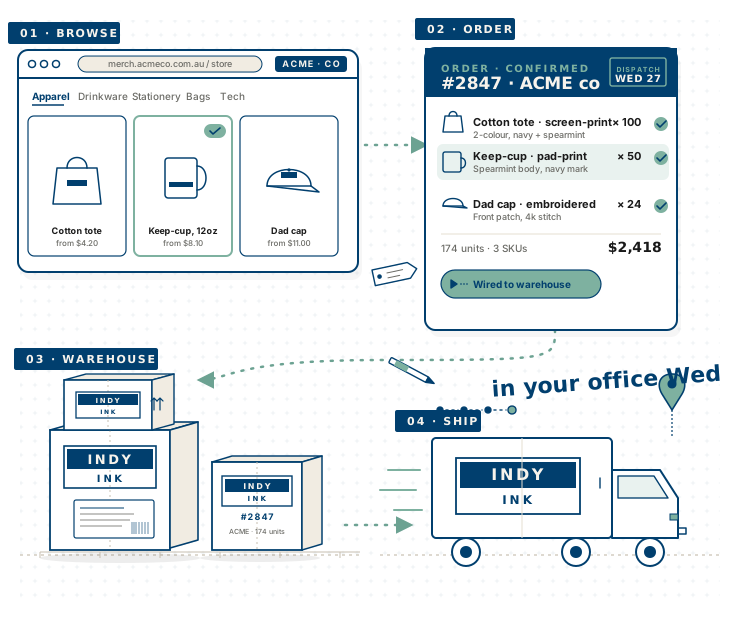
Branch managers shouldn’t be print project managers.
Marketing teams and branch managers spend hundreds of hours a year chasing print suppliers, version-controlling artwork, and reconciling invoices against POs that don’t match.
The big platforms are built for warehouse ops, not for the brand team who actually places the order. They look like enterprise SaaS from 2011 and price like it too.
Meanwhile your competitor’s 200-store rollout just shipped on time, because their team had a portal that did the boring bits automatically.
One platform.
Many brands. Zero spreadsheets.
A portal per client
Your logo, your palette, your wordmark on every screen. Your contracted catalogue. Your prices. Looks like you, not us.
Your team self-serves
Branch managers and end-users order what they need. Approval flows kick in only where you want them — optional per tenant, audit trail always on.
We do the production
Proofs, print, dispatch, consignment tracking. You watch live status from brief to box. Sample on your desk Wednesday.
Eight features your team will actually use
— from day one.
Per-tenant branding
Your domain, your colours, your wordmark on every screen. The portal feels like an internal tool, not a vendor SaaS.
Catalogue + variants
Vetted products, contracted pricing, real-time stock. Out-of-stock variants disabled at the click — no surprise back-orders.
Manager approval, optional
Flip per tenant. Orders flow straight through, or sit pending sign-off with full audit trail. Per-branch budget caps.
Cost-centre attribution
Every order tagged to branch, division, or campaign. Reporting rolls up automatically — finance team thanks you.
Custom briefs
Anything not in the catalogue? Send a one-screen brief. Three options and a price within 48 hours. Approved items get added to the catalogue.
Live status, brief to box
Pending → approved → in production → shipped → delivered. Consignment number and carrier on every shipment. End-users see exactly where their order is.
Admin ops dashboard
Orders, tenants, users, products, reporting in one place. Filter, export CSV, or print as PDF. Audit log for every change.
Multi-role access
Admins manage the platform, managers approve their team, end-users order what they need. Nothing more. SSO available.
Multi-tenant from the ground up.
Live across four verticals.
We’ve shipped this platform to political parties, hospitality groups, real-estate networks and community organisations across Australia. Each runs on the same platform with their own brand, catalogue, and rules.
Questions buyers ask before booking the walkthrough.
What is a multi-tenant B2B shopfront?
A multi-tenant B2B shopfront is a single platform that runs many isolated branded ordering portals — one per client, branch, brand, or campaign. Each tenant has its own subdomain, palette, catalogue, prices, approvers, budget rules, and reporting. Data is partitioned per tenant; admins of one tenant cannot see another tenant's orders. The infrastructure scales horizontally as new tenants are added.
How is this different from a normal e-commerce store?
Multi-tenant ordering platforms are built for internal teams placing recurring orders against a contracted catalogue — not for the general public buying one-off products. Each tenant has its own brand, catalogue, approval rules, and cost-centre tagging. The same platform runs dozens of brands behind the scenes.
Can my team order custom items not in the catalogue?
Yes. The custom brief feature lets users submit a one-screen request. Three concept options and a price come back within 48 hours. Approved items can be added to the standing catalogue for repeat orders.
Does it integrate with our finance or ERP system?
Yes. Orders flow into Xero, MYOB, NetSuite, or SAP Business One — wherever your finance team already works. Cost-centre tags map directly to your chart of accounts. PO matching is automatic.
What roles does the platform support?
Three roles: Admins (manage the platform, all tenants, all data), Managers (approve their team's orders, see their branch's reporting), End-users (order from their tenant's catalogue). SSO is supported via Okta, Azure AD, or Google Workspace.
How long does setup take?
First tenant live in 4-6 weeks. Each additional tenant takes 1-2 weeks (branding, catalogue load, rules configuration). We handle the production, dispatch, and tracking integration on day one.
Can I try the live portal?
Yes — a live tenant runs at indyink-portal.vercel.app. Login required. Request access via the contact form and we will provision a guided demo account, or book a 30-minute walkthrough and we will share-screen through it together.
Researching a multi-tenant build? These help.
Sister product, related case study, and the honest custom-vs-SaaS framework that informs every portal we build.